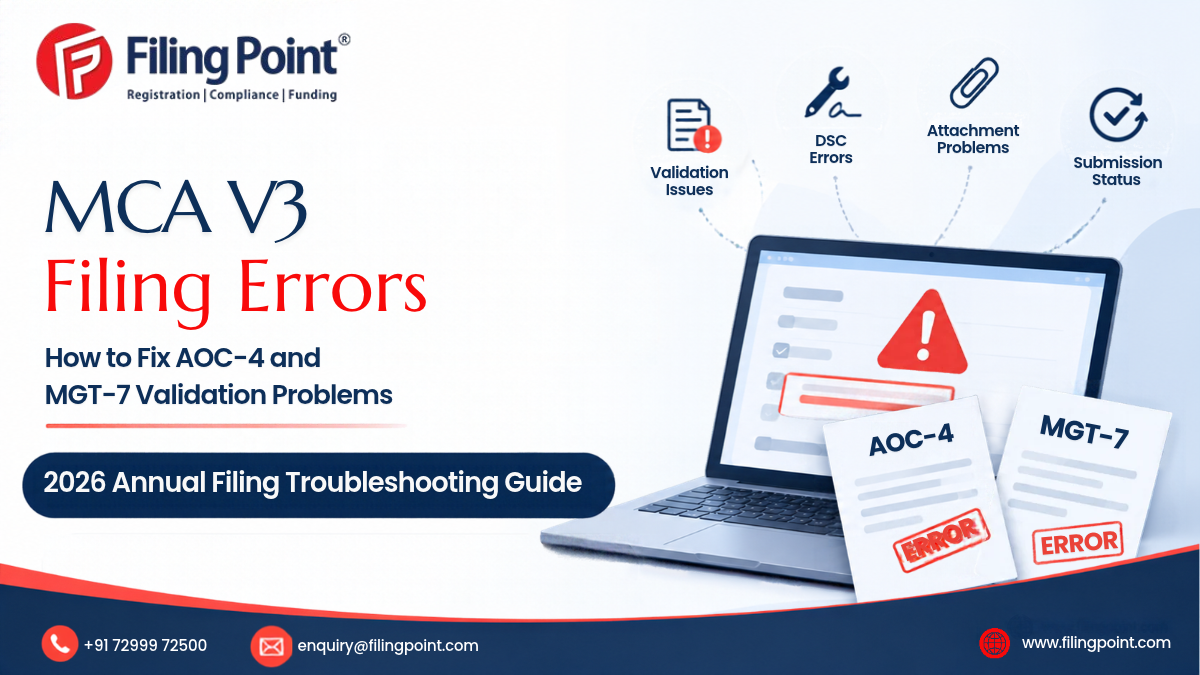
You have prepared your company’s financial statements, checked the annual return details and started filing the required forms on the Ministry of Corporate Affairs (MCA) portal. But the process stops unexpectedly.
AOC-4 displays a validation error. MGT-7 does not accept the Excel attachment. The portal shows incorrect pre-filled information. Your Digital Signature Certificate (DSC) is not recognised. In some cases, the form appears to have been submitted, but the Service Request Number (SRN) is not immediately available.
These problems can be frustrating, particularly when a company is trying to complete its annual ROC filing.
MCA V3 has introduced changes to the filing workflow, including form-specific processes and Excel-based attachments for certain filings. The Institute of Company Secretaries of India (ICSI), in its representation dated 20 December 2025, documented several difficulties reported by professionals, including AOC-4 validation failures, MGT-7 and MGT-7A data issues, Excel upload failures, missing SRNs and portal timeouts.
However, not every error has the same cause. Some problems arise from incorrect information or incomplete attachments. Others may be related to the browser, DSC setup, user permissions or portal-side processing.
This guide explains how to identify common MCA V3 filing problems, what to check before trying again, how to protect your filing records and when professional assistance may be appropriate.
Important: Do not change statutory information simply to make a form pass validation. The information submitted to the MCA must remain consistent with the company’s approved financial statements, statutory registers and underlying records.
What Is MCA V3 and Why Are Companies Facing Filing Problems?
MCA V3 is the Ministry of Corporate Affairs’ online platform for company and LLP-related services and statutory filings.
The annual filing workflow includes preparing the applicable e-form, entering company information, attaching the required documents, completing validations, applying the required digital signature and submitting the form.
The V3 filing environment introduced changes to the way certain forms are prepared and submitted. Depending on the form, companies may need to work with:
- Online form fields and pre-filled company information.
- Form-specific attachment requirements.
- Downloadable or generated Excel templates.
- Digital Signature Certificate association and verification.
- Pre-scrutiny and validation checks.
- SRN generation and payment confirmation.
- Subsequent processing or resubmission, where applicable.
These steps create several opportunities for errors.
For example, a company may have accurate financial statements but encounter a technical attachment problem. Another company may be able to upload the form but discover that its pre-filled share-capital details do not match its records.
It is important to identify whether the problem is:
- A data or documentation issue.
- A form eligibility or selection issue.
- A DSC or user-account issue.
- A file-format or attachment issue.
- A portal or server-side issue.
- A post-submission processing or payment issue.
The correct response depends on the category.
Which Annual Filing Forms Are Commonly Affected?
The main forms relevant to this guide are AOC-4 and MGT-7/MGT-7A. They serve different purposes and should not be treated as interchangeable.
| Form | Purpose | Main information involved |
| AOC-4 | Filing financial statements | Financial statements and applicable supporting documents |
| AOC-4 CFS | Filing consolidated financial statements | Consolidated financial statements and applicable attachments |
| AOC-4 XBRL | Filing financial statements in XBRL format | Structured financial data and related documents |
| MGT-7 | Filing annual return | Company, director, member and shareholding information |
| MGT-7A | Abridged annual return for eligible OPCs and small companies | Applicable company and annual-return information |
A company should confirm the correct form before preparing its filing.
For example, an eligible small company may be required to use MGT-7A rather than MGT-7, subject to the applicable statutory definition, exclusions and current filing instructions. The company should not choose a form merely because the portal displays it first.
Likewise, using MGT-7A does not remove the company’s separate financial-statement filing obligations.
Common MCA V3 Filing Errors Reported by Professionals
ICSI’s 20 December 2025 representation to the Ministry of Corporate Affairs listed difficulties experienced by professionals using MCA V3.
The reported issues included:
AOC-4 problems
- Difficulty generating PDF versions of forms after submission.
- Frequent validation errors during form processing.
- SRNs not appearing or being retrievable after submission.
- Incorrect company forms being downloaded.
- Problems with certain earlier V2 SRNs.
- Difficulty entering reasons for changes in previous-year figures.
AOC-4 XBRL problems
- File validation failures.
- Redirection to another form without allowing the user to proceed.
- Inability to upload certain forms.
- Validation messages advising users to contact the administrator.
MGT-7 and MGT-7A problems
- Incorrect Excel files being uploaded.
- Conflicting prompts to use MGT-7 or MGT-7A.
- Incorrect pre-filled authorised share-capital information.
- Excel templates failing to upload.
- Generated Excel files that could not be opened.
- Incomplete or inaccessible business-activity dropdown options.
- Difficulty entering certain premium amounts.
General portal problems
ICSI also reported slowdowns, timeouts, website access problems and SRNs reportedly being cancelled while forms were awaiting DSC affixation.
These reports are important because they show that not every failed filing is necessarily caused by a company’s incorrect data. However, they are stakeholder-reported issues, not a guarantee that the same defect affects every user or filing.
How to Fix AOC-4 Pre-Scrutiny and Validation Errors
AOC-4 is used to file a company’s financial statements and applicable supporting documents with the Registrar of Companies.
A pre-scrutiny or validation failure means the form has not passed the relevant checks. The message may relate to missing information, inconsistent data, an attachment problem or a technical issue.
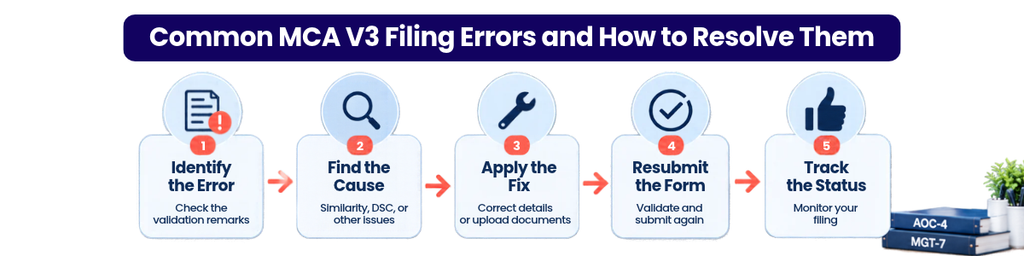
Step 1: Read the complete error message
Do not rely only on the headline message.
Record:
- The exact error text.
- The form name and version.
- The stage at which it appears.
- The date and time.
- The section or field involved.
- Whether the error appears before or after DSC affixation.
A screenshot is useful, but retain the original form and attachments as well.
Step 2: Review mandatory fields
Check whether all mandatory fields have been completed.
Review the company identification details, financial year, AGM information and other form-specific fields.
Do not enter an estimated or invented value to bypass a mandatory field.
Step 3: Compare the figures with approved financial statements
Check whether the information entered in the form agrees with the approved financial statements and applicable documents.
Pay particular attention to:
- Balance sheet figures.
- Profit and loss information.
- Previous-year figures.
- Share capital information.
- Related-party disclosures, where applicable.
- Consolidated information, where relevant.
A difference may have a legitimate explanation, but it should be supported by the company’s records and disclosed where required.
Step 4: Check attachments
Confirm that the correct documents have been attached and that the files open properly.
Check whether the applicable form instructions prescribe a particular file type, size, naming convention or template.
Do not assume that an attachment is accepted simply because the upload appears to have completed.
Step 5: Validate again
After correcting a verified issue, save the form and repeat the applicable validation process.
If the same error continues despite correct information and attachments, preserve the evidence and raise the issue through the appropriate MCA support channel.
When professional review is useful: If the validation error involves financial figures, previous-year balances, audit documents or a difference between the form and approved accounts, ask a qualified professional to review the filing before changing the underlying data.
Why AOC-4 May Show Financial Year or AGM Date Mismatches
AOC-4 contains information connected with the company’s financial statements and annual general meeting.
A mismatch may occur when the information entered in the form does not agree with the company’s approved records or other filing information.
Possible causes include:
- Incorrect AGM date entered in the form.
- Incorrect financial-year selection.
- A previous filing containing a different date.
- A genuine change in the company’s meeting or reporting circumstances.
- Incorrect or outdated information carried forward.
- A portal-side pre-fill or validation issue.
What should the company check?
Start with the approved AGM minutes and notice, the financial statements and the company’s filing history.
Compare the AGM date and relevant financial-year information across the records.
If the company has held its AGM on a different date from the one appearing in an earlier document, determine why the difference exists before proceeding.
Do not simply change the date in one form to match another form if the underlying records do not support that change.
If the difference is genuine, obtain professional advice on the correct disclosure and filing treatment.
How to Resolve DSC Errors During MCA V3 Filing
A Digital Signature Certificate is used to authenticate filings by the authorised signatory.
A DSC-related problem can stop a filing even when the form and attachments are otherwise ready.
Common issues include:
- DSC not associated with the correct MCA user.
- DSC not detected by the signing utility.
- Expired or revoked DSC.
- Incorrect signatory details.
- Browser or local-system configuration problems.
- Token driver or certificate detection issues.
- Signatory not having the required role or authority.
DSC troubleshooting checklist
- Check whether the DSC is valid and has not expired or been revoked.
- Confirm that the certificate belongs to the authorised signatory.
- Check whether the DSC is associated with the correct MCA user account.
- Confirm that the token and required drivers are working.
- Check the current MCA signing utility requirements.
- Close and reopen the browser or signing application if the certificate is not detected.
- Avoid repeated signing attempts if the portal is displaying an unclear or changing status.
If the DSC is valid but the portal continues to reject it, preserve the error message and raise a support request.
Do not use another person’s DSC merely to get the form submitted. The signatory must have the appropriate authority and responsibility.
Why AOC-4 Attachments May Not Upload
An attachment may fail because of an incorrect file, unsupported format, file-size restriction, corrupted document or portal-side issue.
The exact requirements depend on the form and its current instruction kit.
Check the following before uploading
File format: Confirm that the form accepts the format being uploaded.
File size: Check the maximum permitted size in the applicable instruction kit or portal field.
File integrity: Open the document and confirm that it is not corrupted or password-protected where that is not permitted.
Document completeness: Confirm that the attachment contains all required pages and signatures.
Correct version: Make sure the document corresponds to the relevant financial year and approved records.
Attachment mapping: Confirm that the correct document has been placed in the correct attachment field.
For example, uploading an auditor’s report in a field intended for another document may cause a validation problem even if the file itself is valid.
If the file meets the published requirements but still fails repeatedly, capture the error and escalate it rather than repeatedly modifying the document.
How to Fix Director, Member and Shareholding Mismatches in MGT-7
MGT-7 is an annual return. It contains information about the company, its directors, members, shareholding and other prescribed particulars.
A mismatch may arise when the information entered in the annual return does not agree with the company’s statutory records or MCA records.
Information to reconcile
- Director details.
- Member details.
- Shareholding at the relevant dates.
- Changes in shareholding during the year.
- Authorised and paid-up share capital.
- Registered office information.
- Meeting details.
- Other prescribed annual-return particulars.
Documents to review
Depending on the issue, the company may need to review:
- Register of Members.
- Register of Directors and Key Managerial Personnel.
- Share certificates and allotment records.
- Share transfer records.
- Relevant board and shareholder resolutions.
- Previous annual returns.
- Filed forms relating to changes in directors or share capital.
A portal mismatch should not be resolved by changing the statutory register or annual return without checking which record is correct.
If the company’s statutory records are incomplete or inconsistent, the matter may require more than a simple portal correction.
MGT-7 and MGT-7A Excel Attachment Problems
Some MCA V3 filing workflows involve downloadable or generated Excel templates.
ICSI’s December 2025 representation specifically reported problems with Excel uploads and generated files in MGT-7 and MGT-7A.
Potential causes include:
- Wrong template used.
- Template downloaded for a different form.
- File modified in a way that affects its structure.
- Incomplete mandatory information.
- Unsupported file version or format.
- File corruption.
- Portal-side processing failure.
A safer approach
- Download the applicable template through the current MCA filing workflow.
- Confirm the form name and relevant financial year.
- Preserve an untouched copy of the original template.
- Enter information in the designated fields.
- Avoid changing protected cells, formulas or template structure.
- Save the file in the format prescribed by the portal.
- Reopen it to confirm that the data is retained.
- Upload it through the relevant form workflow.
If the generated Excel file cannot be opened, do not recreate the template from scratch unless the current MCA instructions expressly permit that method.
Keep the original download and a screenshot of the error. If the issue persists, raise a support ticket.
What to Do When MCA V3 Shows an Error After Submission
A form that appears to have been submitted is not necessarily a successfully processed filing.
The company should identify the actual status before attempting another submission.
What to check
- Was an SRN generated?
- Was payment completed, if applicable?
- Is the form visible in the filing history?
- Is the status pending, approved, rejected, resubmission required or another status?
- Is a challan or acknowledgement available?
- Has the portal generated the submitted PDF?
The exact status labels and processing sequence may vary according to the form and filing workflow.
Avoid duplicate submissions
If the first submission appears to have gone through, do not immediately create a second filing.
First check the SRN, payment and filing history. Duplicate attempts may create confusion and can complicate reconciliation.
If the SRN is missing or the status is unclear, save the available evidence and contact MCA support.
How to Check MCA SRN, Payment and Filing Status
The SRN is an important reference for tracking an MCA filing.
After submission, retain the available acknowledgement and payment details.
A company should maintain a filing record containing:
| Record | Why it matters |
| Company name and CIN | Identifies the company |
| Form name | Identifies the filing |
| Financial year | Links the filing to the relevant period |
| SRN | Helps track the transaction |
| Submission date | Records when the form was submitted |
| Payment reference | Helps reconcile payment |
| Challan or receipt | Supports payment verification |
| Current filing status | Shows the latest available position |
| Submitted form copy | Preserves the filed information |
If payment is successful but the SRN or filing status is not updated, do not assume that the filing is complete.
Check the transaction and portal records. If necessary, raise a support request with the payment reference, timestamp and available acknowledgement.
How to Handle AOC-4 or MGT-7 Resubmission
A resubmission request means the filing requires further action. It should not be treated as an automatic rejection or as permission to change any information without review.
Start by reading the resubmission remarks carefully.
Identify:
- The field or document questioned.
- The information the Registrar requires.
- Whether the issue relates to a factual mismatch, missing attachment or clarification.
- The applicable response period.
- Whether the requested correction is supported by company records.
Prepare a response that addresses each point.
If the requested change affects financial statements, shareholding, director information or another statutory record, review the underlying documents before modifying the form.
Keep a copy of the original submission, the resubmission remarks, corrected documents and final response.
Where the remarks are unclear or appear inconsistent with the records, seek professional advice rather than guessing.
MCA V3 Portal Errors: When to Retry and When to Escalate
Not every portal issue needs a professional intervention. Some are temporary or related to the user’s system.
| Situation | Sensible first action |
| Portal page does not load | Retry later and record the time |
| Session expires | Sign in again and check whether the form was saved |
| DSC not detected | Check certificate, token, association and signing utility |
| Excel upload fails | Verify the correct template and file integrity |
| Financial figures mismatch | Reconcile with approved financial statements |
| Director or shareholder details mismatch | Review statutory registers and filed records |
| SRN not visible | Check filing history and payment records before retrying |
| Resubmission remarks received | Review each remark and prepare a documented response |
When to raise an MCA helpdesk ticket
Raise a support request when:
- The portal repeatedly displays a technical error despite correct information.
- A submitted form or SRN cannot be retrieved.
- A payment has been completed but the filing status remains unclear.
- The portal displays contradictory form-selection instructions.
- The correct template cannot be generated or uploaded.
- A valid DSC is not recognised despite the required checks.
Include the CIN, form name, SRN if available, date and time, exact error text and relevant screenshots.
Do not share DSC private keys, passwords or OTPs in a support request.
October 2026 MCA Annual Filing Update: What Companies Should Know
MCA General Circular No. 05/2026 dated 24 October 2026 provides a specific relaxation for certain annual filings relating to FY 2025–26.
The circular allows the following forms to be filed without additional fees up to the stated dates:
| Forms | Financial year | Date allowed without additional fees |
| AOC-4, AOC-4 (CFS), AOC-4 (XBRL), AOC-4 NBFC (Ind AS), AOC-4 CFS NBFC (Ind AS) | FY 2025–26 | 31 December 2026 |
| MGT-7 and MGT-7A | FY 2025–26 | 31 January 2027 |
This relief is specific to the forms and financial year named in the circular.
The circular does not extend the statutory deadline for holding the AGM. It also should not be assumed to cover other forms or earlier financial years.
Companies should therefore:
- Confirm whether the circular applies to the relevant form and financial year.
- Check whether the AGM was held within the applicable statutory timeline.
- Complete financial-statement preparation and approval.
- Resolve technical errors early.
- File within the applicable relaxed period.
- Retain the circular and filing evidence with the compliance records.
Do not wait until the last day to resolve a portal issue. A technical problem that might be manageable earlier can become more difficult when many users are filing close to a deadline.
How to Prevent MCA V3 Filing Errors
A structured review before submission can reduce avoidable problems.
Before preparing the form
- Confirm the company’s legal category.
- Confirm the correct form and financial year.
- Check the applicable current MCA instruction kit.
- Collect approved financial statements and statutory records.
- Review previous filing history.
- Identify any changes in directors, members or share capital.
Before uploading
- Verify every figure and date.
- Reconcile financial and corporate information.
- Check that the correct attachments are ready.
- Confirm that the applicable Excel template is complete.
- Verify the authorised signatory and DSC.
- Keep copies of the original files.
Before final submission
- Review the complete form.
- Run the required validations.
- Confirm that the DSC is applied correctly.
- Check the final submission screen.
- Record the SRN and payment details.
- Download and retain the acknowledgement and filed documents when available.
The objective is not simply to get a form accepted. It is to submit accurate statutory information supported by the company’s records.

When Should a Company Get Professional Help?
A company may be able to resolve a temporary login or browser issue internally. However, more complicated problems need a different approach.
Professional review is worth considering when:
- AOC-4 figures do not reconcile with approved financial statements.
- The company is unsure whether MGT-7 or MGT-7A applies.
- Shareholding or director information differs across records.
- The Excel template repeatedly fails despite following the current instructions.
- A previous filing contains incorrect information.
- The form has been marked for resubmission.
- Payment has been completed but filing status remains unclear.
- The company has several pending annual filings.
- The filing issue may affect other statutory compliance obligations.
A professional should first understand the company’s records and filing history. The correct solution may involve correcting data, preparing an explanation, resolving an attachment issue or escalating a technical defect.
It is not responsible to promise that every portal error can be fixed immediately or that every submission will be approved.
How FilingPoint Can Help With AOC-4 and MGT-7 Filing
MCA V3 filing problems can consume time and create uncertainty for company directors and finance teams.
FilingPoint helps businesses manage their ROC annual filing requirements through a structured process.
Depending on the company’s circumstances and the service agreed, support can include:
- Reviewing the company’s annual filing requirements.
- Checking the applicable AOC-4 and MGT-7/MGT-7A forms.
- Reviewing financial and company information for consistency.
- Checking supporting documents and applicable attachments.
- Reviewing director, member and shareholding information.
- Assisting with the applicable filing workflow.
- Helping review resubmission remarks and supporting documents.
- Maintaining filing acknowledgements and records.
The scope of assistance depends on the issue. A portal-side technical defect may require escalation to MCA, while a statutory-data mismatch may need a review of the company’s underlying records.
Frequently Asked Questions
1. Why is MCA V3 showing a validation error in AOC-4?
The error may relate to missing mandatory information, inconsistent financial figures, an attachment issue, an incorrect form entry or a portal-side problem. Review the exact message and compare the form with the approved financial statements before making changes.
2. What is an AOC-4 pre-scrutiny error?
A pre-scrutiny error indicates that the form has not passed the relevant validation checks. The specific message should be reviewed to identify whether the problem concerns data, attachments or the filing system.
3. Why is MGT-7 not accepting the Excel attachment?
Possible causes include using the wrong template, an incomplete file, file corruption, changes to the template structure or a portal-side upload problem. Download the current applicable template and follow its instructions.
4. Why does MCA V3 show MGT-7A instead of MGT-7?
The applicable annual-return form depends on the company’s legal classification and the relevant statutory requirements. Confirm whether the company qualifies for MGT-7A before selecting a form. Do not rely only on a portal prompt if it appears inconsistent.
5. What should I do if my DSC is not recognised by MCA V3?
Check the DSC’s validity, the authorised signatory details, user association, token drivers and current signing utility requirements. If the issue continues, preserve the error and raise a support request.
6. What if payment is successful but the SRN is not generated?
Check the transaction reference, payment acknowledgement and filing history. Do not immediately submit a duplicate form. If the status remains unclear, contact MCA support with the available evidence.
7. Can I edit AOC-4 after submission?
The available action depends on the form’s processing status and the applicable MCA procedure. Do not assume that a submitted form can be freely edited. Check the status and seek professional advice where correction or resubmission is required.
8. What should I do if MGT-7 is marked for resubmission?
Read the remarks, identify the exact issue, compare the information with statutory records and prepare a response supported by documents. Avoid making unsupported changes just to clear the remark.
9. Does the October 2026 circular extend the AGM deadline?
No. General Circular No. 05/2026 provides specified additional-fee relief for certain FY 2025–26 AOC-4 and MGT-7/MGT-7A filings. It does not extend the statutory time for holding an AGM.
10. Can FilingPoint help resolve MCA V3 annual filing errors?
FilingPoint can help review the applicable forms, company records, attachments and filing issues, and support the agreed ROC annual filing work. Portal-side issues that require MCA intervention may still need to be escalated through the official support channel.
Conclusion
MCA V3 filing errors can arise from different causes. A validation message may point to incomplete information, an incorrect attachment, a mismatch in company records, a DSC problem or a technical issue with the portal.
The safest approach is to identify the exact problem before attempting a correction. Companies should preserve their filing evidence, verify information against approved records and follow the current MCA instructions for the relevant form.
For FY 2025–26, MCA General Circular No. 05/2026 provides additional-fee relief for specified AOC-4 forms up to 31 December 2026 and MGT-7/MGT-7A up to 31 January 2027. The AGM timeline itself has not been extended.
If your company is facing repeated AOC-4 or MGT-7 errors, or if the form contains information that does not match your statutory records, a structured compliance review can help identify the correct next step.
FilingPoint can help your company review and manage its ROC annual filing requirements. Contact +91 72999 72500 or enquiry@filingpoint.com.